

Before BookRouter™ can manage your inventory and help you process orders, you must connect to your marketplace accounts. For most connections, this will require login credentials that you must retrieve from the third-party marketplace. This article will explain how to use those credentials to connect BookRouter™.
The Marketplaces page
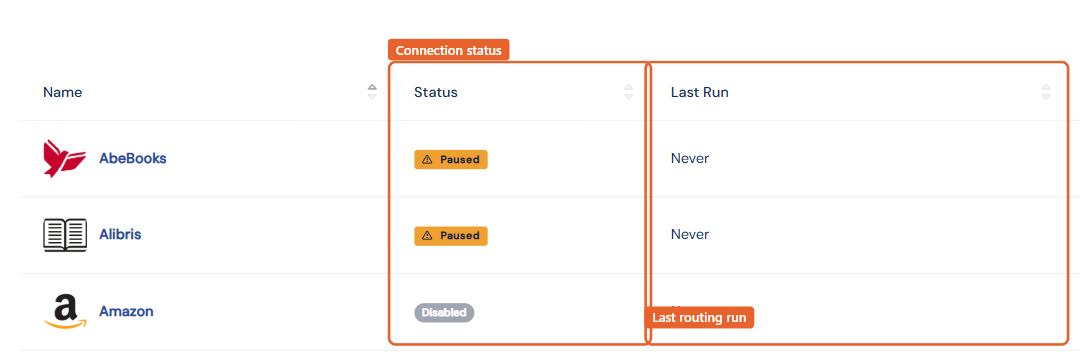
Routing › Marketplaces lists every destination with a status badge (Connected, Not Connected, Paused, Disabled) and the time of its last routing run. Click a marketplace to open its settings.
How connections work
There are two connection styles:
- Sign-in authorization (OAuth): Amazon and eBay connect by clicking Connect and signing in to your seller account to grant BookRouter access. No passwords are stored; authorizations are renewed periodically.
- Upload credentials (FTP): AbeBooks, Biblio, Alibris, and custom routes take the upload username and password issued by the marketplace, entered once under Credentials.
viaLibri is different again: it harvests feeds from your website rather than receiving uploads. See Getting listed on viaLibri.
What every marketplace page has
- Routing Status: Enabled or Paused. Pausing stops uploads without disconnecting anything.
- Pricing Strategy: per-marketplace markups, markdowns, and price-range filters. See Repricing for marketplaces.
- Sync Rules: days to wait before new items upload, and (where supported) automatic sold-item handling. See How sold items are removed automatically.
Orders coming back
Connecting a marketplace is not only about sending inventory out. Most venues also send your orders in, which is what keeps sold items off your other marketplaces automatically. Those orders are managed under Sales & Customers › Marketplace Orders, where you can correct an address, print a packing slip, and mark an order shipped or cancelled. On the marketplaces that allow it, that update is sent back to the venue for you.
- Marketplace Orders: every venue's sales in one place
- Marking a marketplace order shipped or cancelled
- What each marketplace can sync
Connection guides
- AbeBooks
- Amazon
- Biblio (also covers ABAA, IOBA, and Rare Book Hub)
- eBay
- Alibris
- Antiqbook
- viaLibri
- Custom routes (other destinations)
Amazon and eBay are add-on services: email support@bibliopolis.com to activate them on your account before connecting. Current pricing is at bibliopolis.com/pricing.