

By default, an item routes to every marketplace you have enabled. To control it per item:
- Go to Inventory › Manage Inventory and open the item for editing.
- Click the Marketplaces tab.
- Turn the toggle on for each marketplace this item should list on, and off for each it should not.
- Click Save.
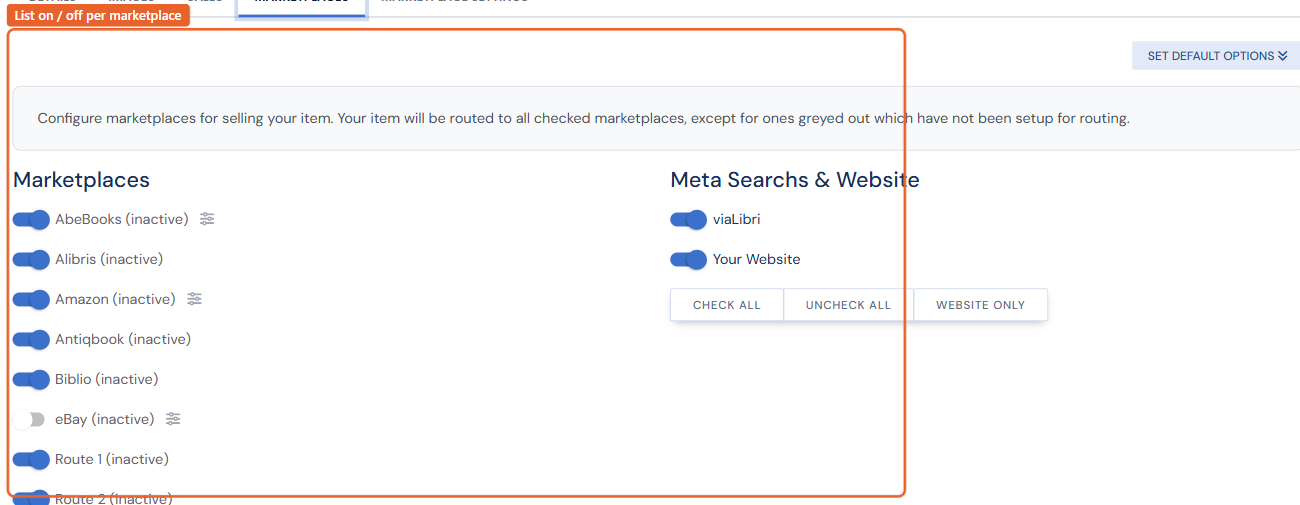
Turning a marketplace off for an already-listed item sends a removal on the next routing run. The same tab's Meta Searches & Website toggles control website and meta-search (viaLibri) visibility. A greyed-out venue has not been set up for routing yet.
Marketplace-specific attributes (an eBay subtitle, Amazon collectible condition, an AbeBooks shipping template) live in the item's Marketplace Settings menu — see Per-item marketplace settings. To exclude many items from a venue at once, consider the venue's price-range filter or Bulk Edit.