

Every question below starts the same way: open the item for editing, change the field, and save.
- Go to Inventory › Manage Inventory.
- Find the item with Find by SKU, Keyword Search, or the filter icon (see Finding items).
- Click the Edit (pencil) icon on the item's row.
- Make the change described below, then click Save.
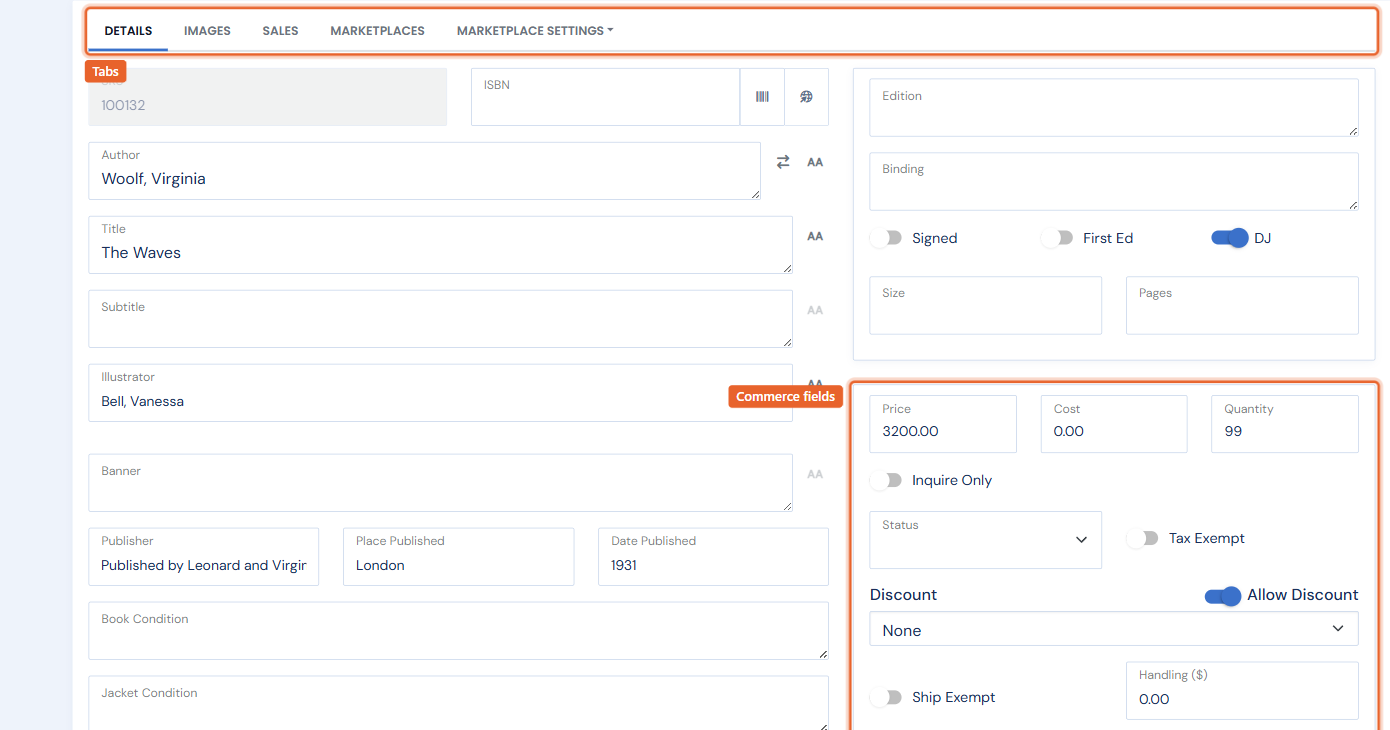
Most of these fields live in the commerce column on the right of the Details tab.
How do I change an item's price?
In the right column, edit the Price box. (Marketplaces can list at a different price when you use per-marketplace pricing rules — see Repricing for marketplaces.)
How do I change an item's cost?
Edit the Cost box. Cost is never shown to customers; it powers the margin numbers in your Sales and Inventory reports, so recording it pays off at reporting time.
How do I change an item's quantity?
Edit the Quantity box (type a value or use the up/down arrows). If a copy sold, use Sell Item in the … menu instead of just lowering the number — it records the sale in your history so reports stay accurate. See Manually marking items as sold.
How do I change an item's weight?
Enter the weight in the Weight (lb) box. Weight matters when your shipping rates are weight-based.
How do I add a handling fee?
Enter an amount in the Handling ($) box. It is added on top of your standard shipping for this item only — useful for oversized or fragile books.
How do I discount an item?
Make sure the Allow Discount toggle is on, then pick an amount from the Discount dropdown (set it back to None to remove it). Allow Discount also controls whether site-wide discounts and coupons apply, so turn it off to exclude a net-priced book from every promotion.
How do I make an item tax exempt?
Turn on the Tax Exempt toggle. No sales tax is charged on this item at checkout or in Point of Sale.
How do I make an item ship exempt?
Turn on the Ship Exempt toggle. The item ships free — no shipping is charged for it at checkout.
How do I record the number of volumes?
Set the Volumes box. Use it for multi-volume sets so the count carries through to your listings.
How do I control website and meta-search visibility?
Open the Marketplaces tab and find the Meta Searches & Website heading. The toggles there control whether this item appears on your website and in meta-search feeds (such as viaLibri), individually.
Changing a field on many items at once? Use Bulk Edit to set price, status, discount, and more across a whole filtered result set in one operation.