

Inventory Backup & Restore (under Settings › Data Tools) lets you take a snapshot of your inventory before risky work, and roll back to it if something goes wrong. It covers your items, their category and catalog assignments, and drafts. Website content, orders, and customer records are separate and are not touched by an inventory restore.
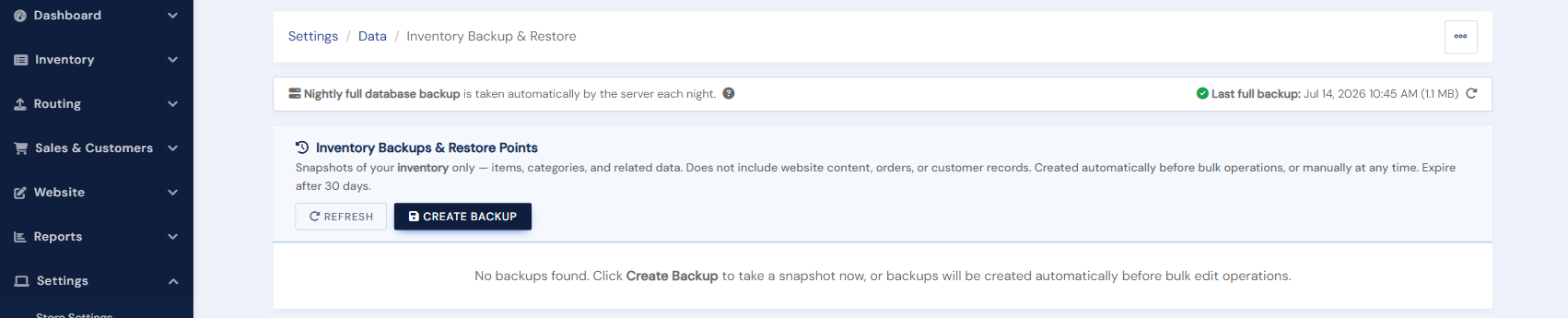
Creating a backup
Click Create Backup. The snapshot runs in the background (large inventories take a little while) and appears in the list when ready, with its date and record count. Take one before a big bulk edit, a risky upload, or any experiment you might want to undo.
Restoring
Click Restore on any ready snapshot and confirm. Your inventory is returned to exactly the state in the snapshot. Anything added or changed after the snapshot was taken is replaced, so restore deliberately.
Automatic restore points
Bulk Edit creates a restore point automatically before destructive operations, and those snapshots appear here too. Snapshots expire after about 30 days.
The nightly backup
Separately from your on-demand snapshots, the platform backs up your full database every night. The page shows when the latest nightly backup ran. If you ever need a restore from the nightly backup, contact support@bibliopolis.com.