

Every sale you record in BookRouter™, from any channel, lands in one sales history. That is what lets the Sales report and All Sales show your website, marketplace, in-store and invoice sales side by side. This article covers recording a sale by hand, for a sale that happened outside the register.
The Sell Item button (single item)
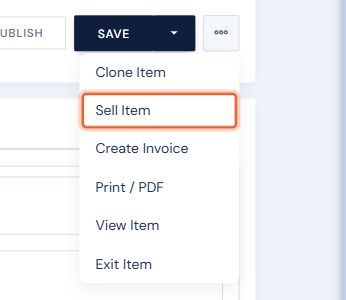
On an item's edit page, open the … menu (next to Save) and choose Sell Item. The item's Sales tab has the same thing as Add Sale.
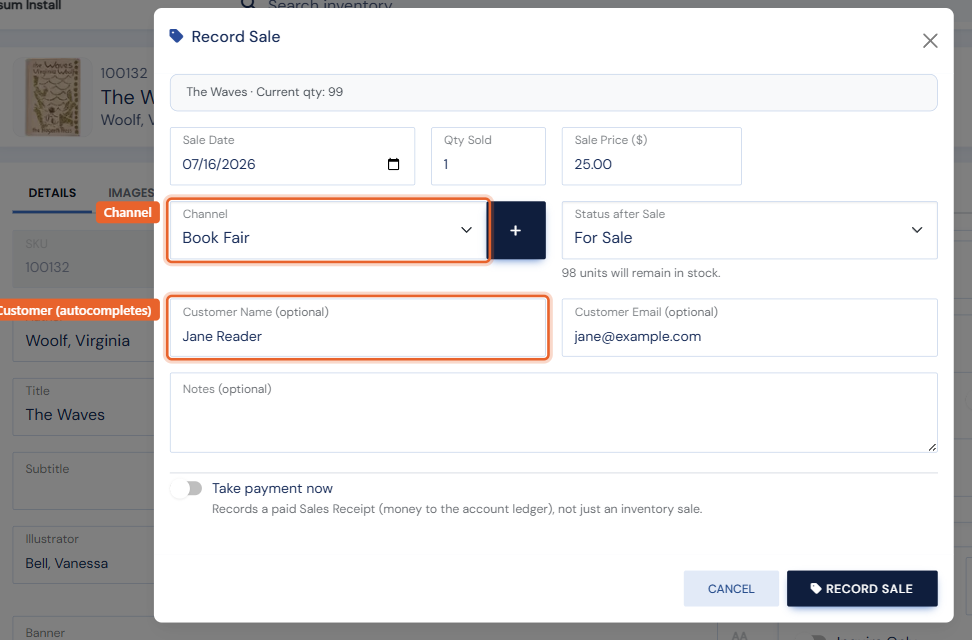
The Record Sale window asks for:
- Sale date, quantity and price.
- Channel: where it sold (book fair, consignment, direct, and so on). To add a channel of your own, click the + beside the menu and type its name; it is kept for next time. See Sales channels.
- Status after sale: what the item's status becomes (usually Sold once the last copy goes).
- Customer (optional): start typing and customers on file are suggested, or enter a name and email.
- Notes.
Saving records the sale, lowers the quantity and updates the status in one step. The sale appears on the item's Sales tab and on All Sales as Recorded by hand. A sale recorded this way can be edited or deleted later (with an option to put the quantity back if it was recorded in error). This records the sale only: no money is taken and no receipt is made.
The Sales tab also lists the item's sales from the register, invoices, your website and marketplaces. Those lines show where they came from (a receipt or invoice number, an order number) instead of Edit and Delete, because they are changed where they came from; see Undoing a sale.
Point of Sale (a full transaction)
When you are ringing up a customer, use Point of Sale instead: it handles several items, discounts, tax, shipping and payment (including charging a card), and produces a receipt. For a sale you are billing later, create an invoice. A customer who later asks for an invoice for a sale you recorded by hand can have one: use Create invoice on its line in All Sales.
Selling many items at once
Recording a box of books sold at a fair? Bulk Edit has a Bulk Sell action: select the items, set the date, channel and customer once, and every item gets a proper sales record.
Website and marketplace sales record themselves. Completed website orders are added automatically, and marketplace sales flow in from your connected venues. Recording by hand is only for sales that happen outside the platform.