

Listing on Amazon can be a fraught process. They have their own way of doing things where even ISBN numbers are treated as foreign entities! That said, we have developed tools to sync your inventory with Amazon successfully. One of the most powerful ways of maximizing your Amazon listings is to import your Amazon Active Listings Report and either use it to update (or add the items to) your current BookRouter™ inventory.
How to export your Amazon Active Listings
- Log in to your Amazon Seller Central account.
- Click the menu icon (the "hamburger" lines) in the top-left corner.
- Hover over Reports > Inventory Reports.
- Choose Active Listings Report from the drop-down report type menu. (see screenshot)
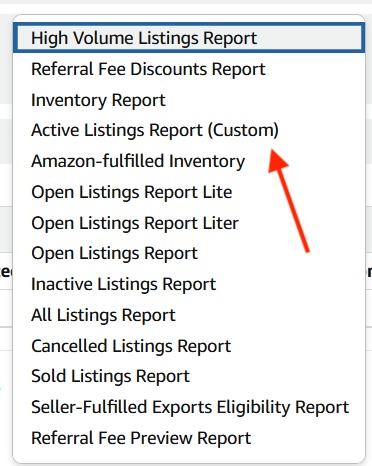
5. Click Request Report.
Wait a few minutes for Amazon to generate the file, then click Download once the status changes to 'Ready.'
Key Details to know about the Active Listings Report
Format: The file is tab-delimited and can be opened in spreadsheet programs like Microsoft Excel or Google Sheets.
Contents: It includes a snapshot of all listed products, including SKUs with zero quantity, product titles, ASINs/identifiers, and prices.
Limit: This specific report works best if you have 50,000 or fewer listings. If you have more, use the standard comprehensive Inventory Report.