

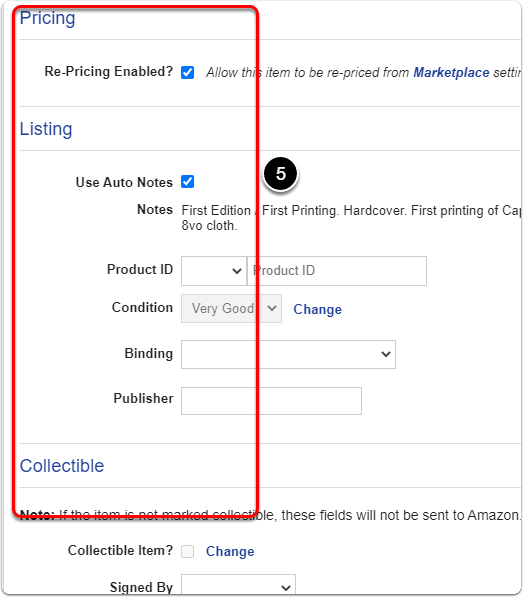
Your item's Amazon Properties window is where you edit everything specific to that item's Amazon listing: its binding, publisher, notes, collectible details, shipping, and quantity.
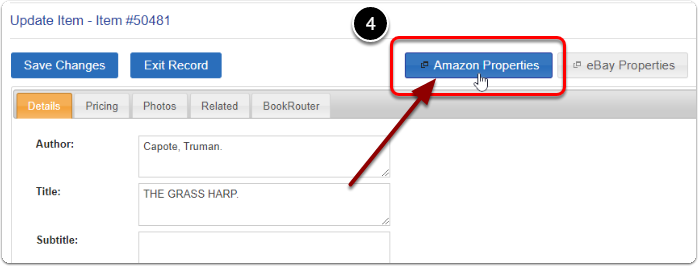
To open it: click 'Manage Inventory' under the 'Inventory' heading of the Control Panel, search for your item, and click its 'Edit' link. Then click the 'Amazon Properties' button.
Expand the section below for the property you want to change. In every case, scroll down and click 'Save Properties' when you are finished.
Change the binding
Under the 'Listing' heading, set 'Binding' to the option that best describes your item.
Change the publisher
Under the 'Listing' heading, fill in the 'Publisher' field.
Edit the listing notes
Under the 'Listing' heading, uncheck 'Use Auto Notes', then edit the 'Notes' text box that appears. By default BookRouter uses your generic listing description as the Amazon note.
Mark an item as collectible
Under the 'Collectible' heading, click 'Change' next to 'Collectible Item?' and check the box. Then set the collectible details, such as 'Signed By', edition, and condition.
Edit the shipping settings
Under the 'Shipping' heading, edit your item's shipping settings. To change 'Ship Internationally?' or 'Standard Plus?', click 'Change' next to it, then check or uncheck the box.
Set the quantity to zero (remove from sale)
Click the 'Set Quantity to Zero' button. This removes the item from sale on Amazon while keeping its listing in place.