

Payment Gateways allow for real-time credit card processing. You must connect to a payment gateway for your website (and/or your Point of Sale) to charge credit cards. BookRouter™ currently supports five gateways. The are all managed from a single hub at Settings › Selling Options › Payment Gateways.
Choosing a Gateway
Each gateway has its own panel on the Payment Gateways hub. The screenshot below shows you the list of options including Square, Authorize.net, Braintree, Stripe and PayPal. Select a gateway, follow instructions to connect it with BookRouter™, then make it the active gateway. This will allow the Point of Sale and/or your website to process credit cards.
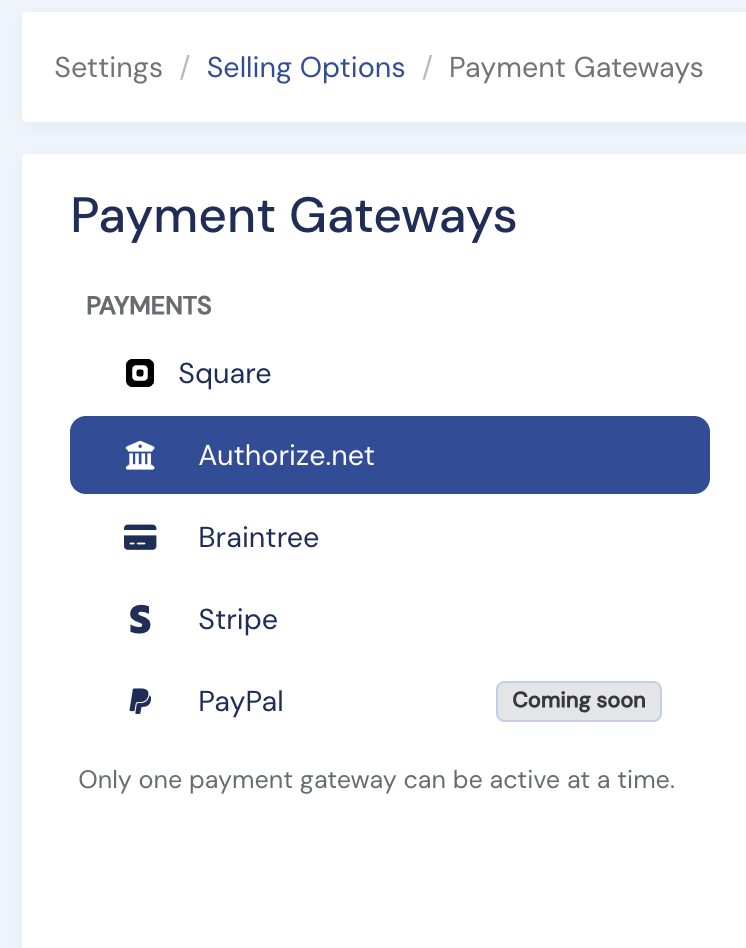
Only one gateway can be active at a time. The Active gateway indicator at the top-right always shows which one is live (or None).
Square
Square is currently the most commonly selected option among BookRouter™ users. Square supports Google Pay and Apple Pay. Options include delay capture (authorize now, capture within six days) and Strong Customer Authentication (3D Secure) for EEA/UK sellers.
To connect to square you don't need to do any copying of keys or code. Simply use the sign-in authorization (see How do I connect Square?).
Authorize.net
Enter your Login ID and Transaction Key from your Authorize.net account, choose the authorization type, and optionally enable CIM (Authorize.net's stored-card vault), which lets you charge a saved card later from the order page.
Braintree
Enter your Braintree Merchant ID, Public Key, and Private Key, then make it active.
Stripe
Instructions coming soon. Contact support@bibliopolis.com for help.
PayPal
Coming soon.
There are no extra fees (we do not take a commision) when using a payment gateway. You pay only your gateway's own processing rates.
Not sure which to choose, or need a hand connecting? Use Contact Support on the gateway's panel.