

Manage Orders is where your website orders live — from "just placed" through shipped — and where you handle payments, refunds, and cancellations. In-progress shopping carts are not here; they have their own Shopping Carts page.
How to find it
Open Sales & Customers in the left menu and click Orders.
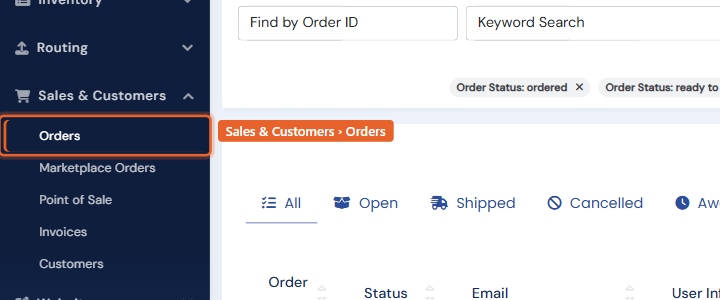
The order list
Tabs across the top filter by lifecycle: All, Open (paid, not yet shipped), Shipped, Cancelled, and Awaiting Payment (orders with an outstanding payment request). Search by order number or keyword, or open the filter panel for status, payment, and date filters. Click an order number to open it.
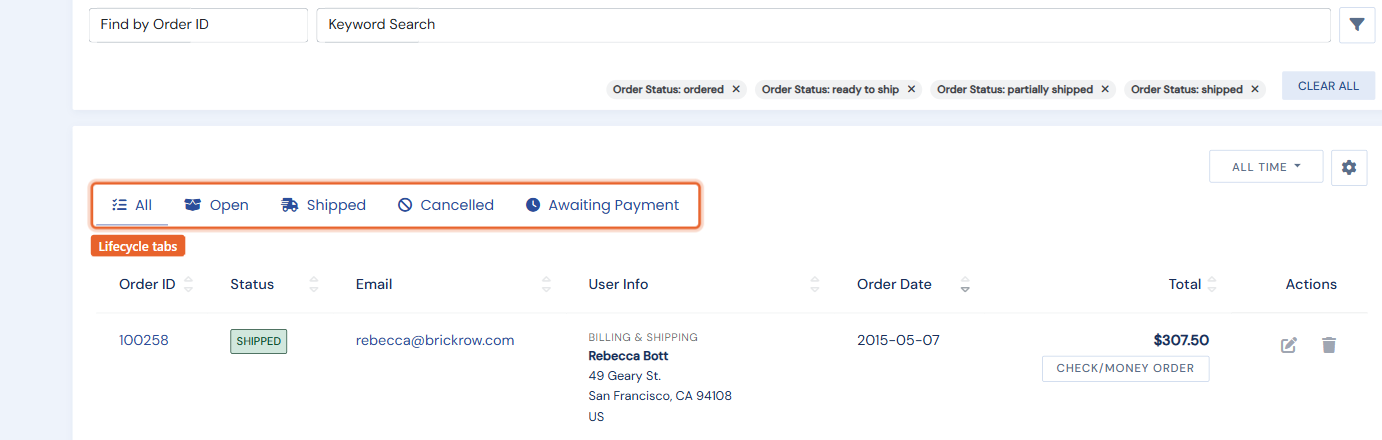
The order page
The top of an order shows the shipping and billing addresses, payment details with the gateway status chip, and a fraud score for card orders. Below are the line items and totals.
- Change status: use the status button to move the order through Open, Ready to Ship, Shipped, or Cancelled. Status changes can email the customer their confirmation or shipping notice.
- Shipments and tracking: record the carrier and tracking number; the shipping-confirmation email includes it.
- Print a receipt: the … menu produces a themed PDF receipt (see Document appearance & your brand).
Cancelling an order
When you set an order to Cancelled, BookRouter offers two checkboxes in the same step: reverse the card payment (a void if the charge has not settled, a refund if it has) and return the items to stock. Both are on by default, so a cancellation is one action instead of three.
Refunds and collecting payment
On a paid card order, the payment card shows a Refund button (full, or partial with an amount); refunds go through your gateway (Square, Authorize.net, Braintree). Need more money on an order? Collect Payment offers the best available method: charge the card on file, email a secure payment link, key in a card, or record a pending amount. Pending requests appear on the Awaiting Payment tab until resolved.
Refund and payment actions are permission-gated — only staff you have granted payments access can move money. And note that this page is specifically your website's orders. Sales made on AbeBooks, Alibris, Amazon, Biblio and eBay have their own page, Marketplace Orders, where you can work them to completion and update the venue.