

By default, email from your store is sent from noreply@bookrouter.com. This helps ensure reliable delivery and keeps messages from being flagged as spam. If you'd rather have store email sent from your own email address, your domain first needs to be verified. The following article explains the verification process. Please don't hesitate to email support@bibliopolis.com if you need assistance.
Who Manages Your DNS If Bibliopolis manages (or will manage) your DNS you don't need to make any technical changes yourself. Just let us know that you'd like your store email to come from your own address, and we'll add the necessary records for you. If you manage your own DNS, follow the instructions below to verify your domain.
Verifying Your Store's Sending Somain
Currently BookRouter™ requires verification of two records to send email from your own domain. The Return-Path and DKIM. Please note that we also recommend configuring TXT records for SPF and DMARC. To learn more about these records see SPF, DKIM and DMARC Explained.
Step 1: Go to Your Store Profile Page
In your admin, go to Settings › Account › Store Profile. The email branding section contains the verification tool. See screenshot. Step 2: Click the 'Set Up Verification' button
You will see two DNS records that need to be updated in your DNS records to verify your domain: Return-Path record and DKIM record. See screeshot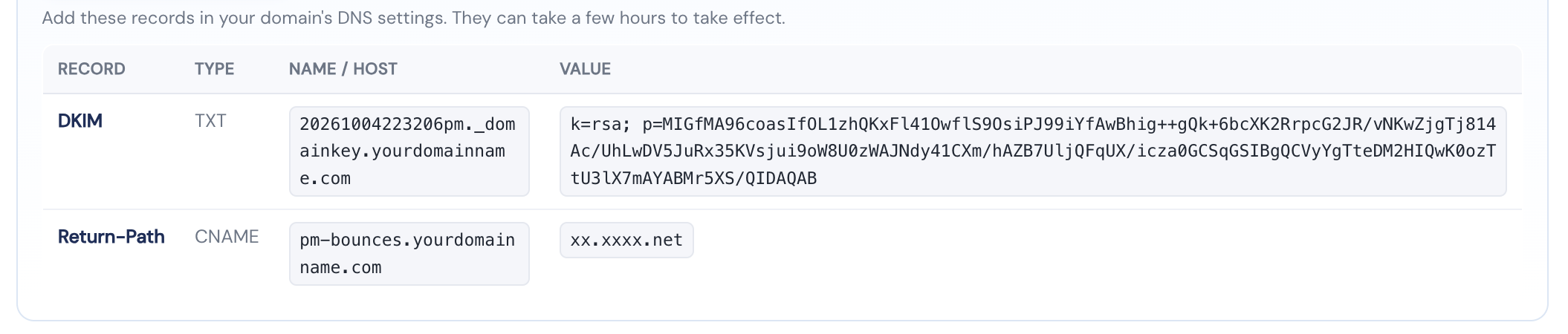
If you have already updated these records, you can click the Check button. The page will confirm that your domain has been successfully verified.
Step 3: Update Return-Path and DKIM Records
Copy the Return-Path and DKIM records shown on the Store Profile page and add them through your DNS provider, such as your domain registrar or Cloudflare. Then return to the Store Profile page and click Check.
Changes can take time to take effect: If your Check does not return a verified status, your changes may not have propagated yet. DNS changes often take effect within a few minutes, but occasionally can take several hours or even a full day.
Recommended: add DMARC
We also recommend adding a DMARC record with a monitoring policy (p=none). It provides an additional layer of email authentication and helps mail providers identify legitimate messages sent from your domain — a p=none policy doesn't tell receiving mail systems to reject or quarantine anything while you monitor. If Bibliopolis manages your DNS, we'll add this record for you.