

Give each person who works in your shop their own login. It keeps actions attributable, lets you limit what each person can do, and means a departure never requires changing a shared password.
Adding a user
On the Admin Users page (Settings › Account › Users & Access), add the person with their email and a role. They log in at the same address you do, with their own credentials. Login supports a one-time email code as a second factor.
Roles
Two roles are built in: SuperAdmin (everything, including user management) and Admin (day-to-day management). You can create custom roles, such as a Cataloger who works in inventory but not payments, and assign each user one.
Fine-tuning permissions
The Override permissions panel on a user (or role) controls access precisely. Everything is open by default; you check boxes to restrict: hide whole sections, hide individual pages, or make pages read-only.
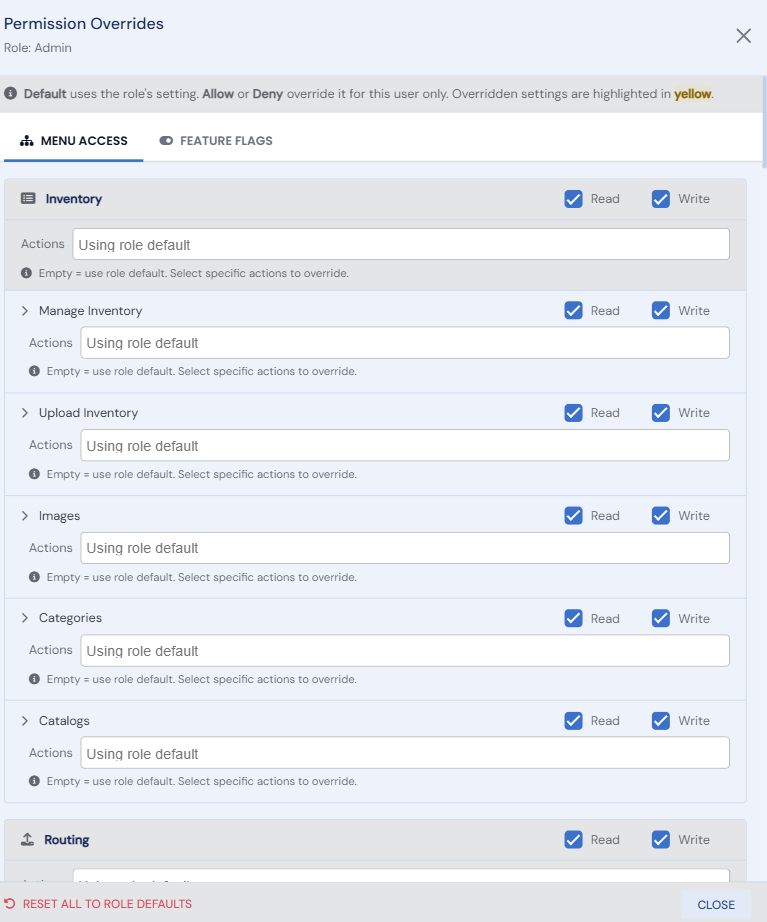
Feature flags grant specific capabilities, most notably:
- Refunds & Card Management: the money-out permission. Without it a staff member can sell, charge cards at the register, and record payments, but cannot refund, void, or cancel payments.
- Billing Access: who can see your Bibliopolis account billing.
- Bulk Edit: on for Admins; grantable to other roles.
A sensible default for counter staff: a custom role with Billing denied and no Refunds flag. They can do everything a busy shop floor needs, and the reversible-money actions stay with you.